

Power Supply (PSU) Guide: Choosing Reliable Power for Your PC
The power supply is often overlooked, yet it’s one of the most critical components in your system. A failing PSU doesn’t just turn off your...

The power supply is often overlooked, yet it’s one of the most critical components in your system. A failing PSU doesn’t just turn off your computer it can damage your CPU, GPU, RAM, and motherboard irreversibly. This is not the place to compromise on quality.
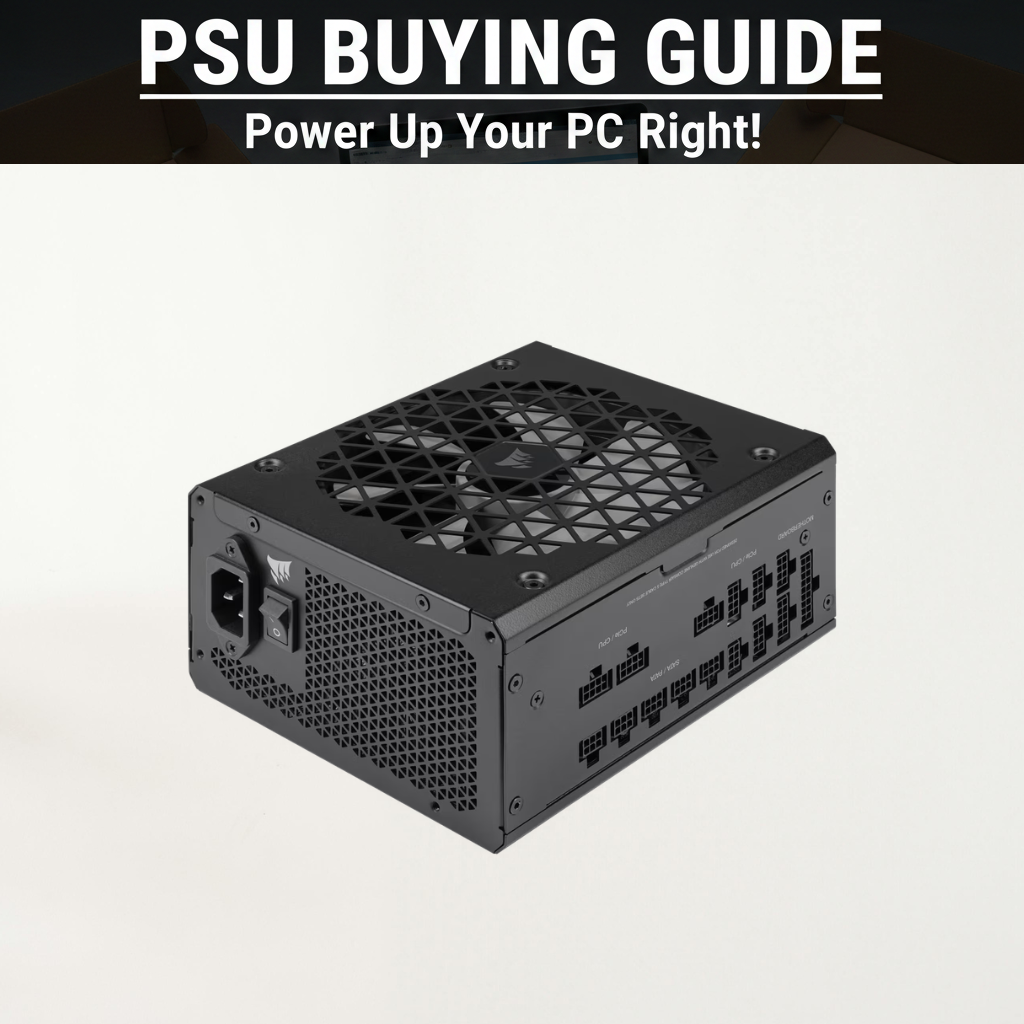
Why Build Quality Matters More Than Wattage
Modern computers are more efficient than ever. You don’t need excessive wattage you need quality construction and stable power delivery.
A well-designed 550W power supply from a reputable manufacturer will outlast and outperform a cheap 800W unit. Power supply quality varies dramatically, even within the same brand. Specifications alone don’t reveal reliability.
The fundamental principle: invest in build quality over raw wattage. Your system components are only as safe as your power supply’s stability.
Understanding Wattage Requirements
Power supply calculators often overestimate. They suggest wattage far above what you actually need sometimes 300W more than necessary. Instead, evaluate your specific components.
Budget Builds (APU or Low-End GPU):
These systems consume minimal power. A quality 450-550W PSU is adequate. Examples: Ryzen 5 8500G without dedicated GPU, or RTX 4050 equivalent.
Mid-Range Builds (RTX 5070 / RX 9070 Class):
Most gaming systems fall here. A quality 650W power supply is comfortably sufficient with margin for upgrades. 750W if you want additional headroom or plan future GPU upgrades.
High-End Builds (RTX 5090 / Top-Tier GPU):
Demanding components require 750W minimum, preferably 850W+. Ensure your PSU has adequate PCIe power connectors for your GPU’s requirements.
Workstations and Multi-GPU Systems:
Systems running multiple high-power components (dual CPUs, extensive storage, water cooling) warrant 1000W+. Rare for consumer builds but necessary for specialized workstations.
Efficiency Ratings: 80+ Certification Explained
PSU efficiency indicates how much power is converted to usable electricity versus wasted as heat. Higher efficiency means:
Lower electricity bills over time
Better component protection through stable voltage
Improved reliability and longevity
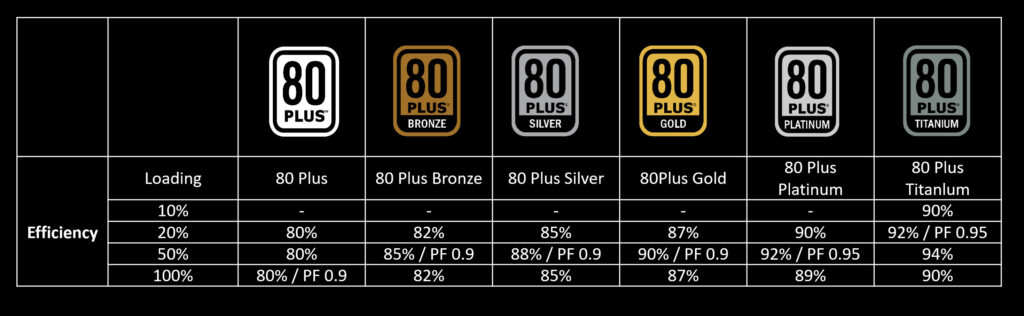
80+ Bronze
80% efficiency at typical loads. Entry-level certification. Uses quality components but generates more heat. Acceptable for basic systems, not recommended for high-end builds.
80+ Gold
87-90% efficiency at typical loads. Excellent balance of quality and efficiency. Recommended for most gaming and productivity builds. Long-term value outweighs modest cost premium over Bronze.
80+ Platinum
89-92% efficiency. Premium quality components and tight voltage regulation. Appropriate for high-end builds, professional workstations, and systems running 24/7. Cost premium is significant but justified for demanding applications.
80+ Titanium
90-94% efficiency. Highest tier with diminishing returns for consumer use. Premium pricing for marginal efficiency gains. Overkill for gaming and most productivity work.
Practical Recommendation: Gold efficiency is the sweet spot for most builders. The modest cost premium over Bronze provides measurable long-term benefits.
Modular vs Non-Modular PSUs
Fully Modular PSU:
All cables are detachable. Connect only the cables you need, leaving unused cables unplugged. Benefits include:
Dramatically improved cable management
Better airflow inside case
Cleaner appearance
Simpler troubleshooting during upgrades
Highly recommended if budget permits.
Semi-Modular PSU:
Essential cables (24-pin motherboard power, 8-pin CPU power) are permanently attached. Other cables (PCIe power, SATA, peripheral) are detachable. Good compromise between cost and cable management.
Non-Modular PSU:
All cables are permanently hardwired. Traditional design with lowest cost but poorest cable management. Not recommended for modern builds where aesthetics and airflow matter.
Connector Types and Specifications
PCIe Power Connectors:
Modern GPUs require dedicated power delivery via PCIe connectors:
6-pin connector – Provides 75W
8-pin connector – Provides 150W
12-pin connector – Provides up to 500W on latest generation GPUs
Verify your PSU includes appropriate connectors for your GPU. Some GPUs require multiple 8-pin connectors or 12-pin connectors.
Motherboard Power:
24-pin ATX connector – Main motherboard power (universal standard)
8-pin or 4+4 pin CPU connector – CPU auxiliary power
All modern PSUs include these. Only relevant if building extremely compact systems with non-standard requirements.
SATA and Peripheral Power:
For storage drives and case fans. Modern builds need fewer of these as M.2 NVMe drives don’t require power connectors.
Voltage Regulation and Ripple
Quality PSUs maintain stable output voltage within specification (typically ±3% tolerance). Poor quality units show voltage sag during peak loads, potentially causing component instability or damage.
Ripple refers to AC noise superimposed on DC output. Lower ripple indicates cleaner power. Quality PSUs maintain ripple below 100mV; cheap units often exceed this, degrading component longevity.
You won’t see these specs on most boxes, but professional reviews measure them. This is why relying on specialized tech reviews matters more than specifications alone.
What to Look For When Buying
Warranty
Quality PSUs typically include 5-10 year warranties. Shorter warranties (1-3 years) often indicate lower quality. Extended warranties are confidence indicators.
FDB Fans (Fluid Dynamic Bearing)
Better than sleeve bearings. FDB fans run quieter and last longer.
Japanese Capacitors
Higher quality than Chinese alternatives. Common in reputable brands.
Fan Control
Quality PSUs include intelligent fan controls fan stays off at low loads, spins faster as power draw increases. Improves efficiency and reduces noise.
Protections
Over-voltage protection (OVP), under-voltage protection (UVP), over-current protection (OCP), and thermal shutdown are standard on quality units. Cheap PSUs often lack comprehensive protection.
Critical Warning
NEVER buy cheap, unknown-brand power supplies. No matter how good the wattage specifications look or how attractive the price, unknown brands are high-risk. Cheap PSUs can:
Deliver unstable voltage causing random crashes
Fail suddenly without warning
Damage your entire PC (CPU, GPU, motherboard, RAM)
Create fire or electrical hazards
Void warranties through component damage
The cost of a failed PSU damaging other components far exceeds the small savings from buying cheap. Invest in quality.
PSU Lifespan and Replacement
Quality PSUs last 7-10+ years under typical use. Budget units may fail within 2-3 years. Electrolytic capacitors degrade over time, which is the primary aging factor.
Signs a PSU needs replacement:
Computer randomly shuts down or crashes
Power-on fails despite motherboard power indicator
Unusual fan noise from PSU
Burning smell (immediate shutdown and replacement required)
Blue smoke or visible damage
Don’t attempt repair replace immediately to protect other components.