

RAM Guide: Understanding Memory for Your PC
RAM (Random Access Memory) is your computer’s short-term memory. It temporarily holds data and programs your system is actively using right now. The more RAM...

RAM (Random Access Memory) is your computer’s short-term memory. It temporarily holds data and programs your system is actively using right now. The more RAM you have, the smoother multitasking becomes and the faster your system responds.
What is RAM?
Think of your computer like an office. The hard drive or SSD is the filing cabinet in the corner (large, slow storage). The CPU cache is your desk where you actively work (small, super fast). RAM is the workspace in between fast enough for quick access, large enough to hold multiple files at once.
RAM is temporary storage. When you power off your computer, everything in RAM disappears. It’s never meant for permanent storage that’s what SSDs and HDDs do. But while your computer runs, RAM keeps the operating system, applications, and active data instantly accessible for the CPU to use.
RAM Types: SDRAM, SRAM, DIMM, and SO-DIMM
SDRAM vs SRAM
You’ll encounter SDRAM (Synchronous Dynamic RAM) in desktop and laptop computers. Don’t confuse it with SRAM (Static RAM), which is used for CPU caches. SRAM is extremely fast but has tiny capacity SDRAM is the standard for consumer computers.
Form Factors: Where RAM Physically Fits
RAM comes in two physical sizes:
DIMM (Dual In-Line Memory Module) – Used in desktops and servers. Approximately 5.25 inches long.
SO-DIMM (Small Outline DIMM) – Used in laptops and compact systems. Significantly smaller than DIMM.
These two form factors are NOT interchangeable. They use different pin arrangements, and you cannot physically force one into the other slot. When buying RAM, check whether your motherboard uses DIMM or SO-DIMM slots.

RAM Generations: DDR2, DDR3, DDR4, DDR5
DDR stands for “Double Data Rate” meaning two data transfers happen per clock cycle. Each generation of RAM is faster and more efficient than the previous, but they’re incompatible with each other.
DDR2 (Obsolete)
The oldest generation still found in older machines. 240 pins. No longer recommended for new builds.
DDR3 (2007-2014)
Released in 2007, officially replaced by DDR4 in 2014. 240 pins for DIMM (same as DDR2 physically, but different notch position prevents mixing). Lower voltage than DDR2 (1.35-1.5V). Still functional but increasingly rare in new systems.
DDR4 (2014-Present)
The mainstream standard used until recently. Introduced 2014 and still widely supported. 288 pins. Operates at 1.2V, providing better efficiency than DDR3. Speeds range from 2133 MT/s to 5100+ MT/s.
DDR5 (2021-Present)
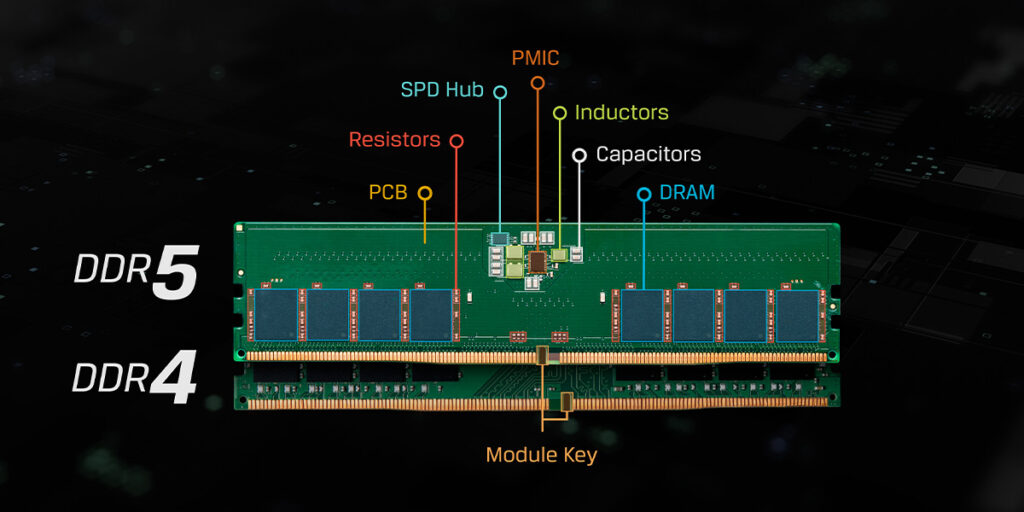
Entered consumer market November 2021. Maintains 288-pin design but operates at 1.1V for improved efficiency. Offers higher frequencies (6400 MT/s+) and greater bandwidth. DDR5 is now standard on AM5 (AMD) and newest Intel platforms. Real-world performance difference over DDR4 remains marginal for gaming and general productivity, but future software increasingly favors DDR5.
Reading RAM Specifications
You’ll often see RAM labeled as “DDR4-3200” or “PC4-19200.” Here’s what those numbers mean:
DDR Designation:
The number after “DDR” refers to megatransfers per second (MT/s). DDR4-3200 performs 3,200 megatransfers per second.
PC Designation:
The “PC” number represents theoretical maximum bandwidth in megabytes per second. PC4-19200 delivers 19,200 MB/s of bandwidth.
Relationship Between Them:
DDR4-3200 and PC4-19200 describe the same RAM module. The bandwidth (19,200 MB/s) equals the speed (3,200 MT/s) multiplied by 8 bytes per transfer (3,200 × 8 = 25,600… actually 19,200 after accounting for specific calculations). Don’t worry about converting manufacturers label both on specifications.
Timings and CAS Latency
RAM timings appear as a series of numbers: “16-18-18-38” or similar. These measure latency in nanoseconds how long RAM takes to respond to requests.
CAS Latency (First Number)
The most important timing specification. CAS (Column Address Strobe) latency measures clock cycles required before data becomes available. Lower is faster.
Practical Latency Calculation:
Latency (nanoseconds) = CAS Latency × (1,000 / Speed in MHz)
For example:
- DDR4-3200 with CAS 16: (16 × 1,000) / 3,200 = 5 nanoseconds
- DDR4-2400 with CAS 15: (15 × 1,000) / 2,400 = 6.25 nanoseconds
Even though the second example has lower CAS, it’s actually slower due to lower frequency.
RAM Latency Reference Table
CAS Latency | DDR4-2400 (ns) | DDR4-3000 (ns) | DDR4-3200 (ns) | DDR5-5600 (ns) | DDR5-6000 (ns) |
CL13 | 5.42 | 4.33 | 4.06 | 2.32 | 2.17 |
CL14 | 5.83 | 4.67 | 4.38 | 2.5 | 2.33 |
CL15 | 6.25 | 5 | 4.69 | 2.68 | 2.5 |
CL16 | 6.67 | 5.33 | 5 | 2.86 | 2.67 |
CL18 | 7.5 | 6 | 5.63 | 3.21 | 3 |
CL20 | 8.33 | 6.67 | 6.25 | 3.57 | 3.33 |
Practical Takeaway: For the same latency, always choose higher frequency RAM. DDR4-3200 CL16 beats DDR4-2400 CL15 in real-world performance due to higher bandwidth.
How Much Do You Need?
8GB – Minimum for Basic Computing
Sufficient for web browsing, document editing, streaming video, and light gaming. Increasingly tight for modern applications. Not recommended for power users.
16GB – Modern Standard
Comfortable for gaming, streaming while browsing, light creative work, and multitasking. Works well for most users. Recommended for current builds.
32GB – For Creators and Power Users
Beneficial for video editing, 3D rendering, software development, heavy multitasking, and virtual machines. Future-proofing for demanding applications. Not necessary for gaming alone.
64GB+ – Professional Workloads
Required only for specialized professional applications like cinema 4D rendering, data science processing, or server environments. Overkill for consumer use.
Choosing DDR4 or DDR5?
DDR4-3200 Benefits:
Widely available and affordable
Proven reliable through years of real-world use
Sufficient performance for gaming and productivity
Best value proposition
DDR5-6000 Benefits:
Future-proof with latest platforms (AM5, LGA1851)
Higher bandwidth for demanding workloads
More efficient (1.1V vs 1.2V)
Supports long-term upgrades within platform
Real-World Difference: For gaming and general productivity, DDR4-3200 and DDR5-6000 feel identical. DDR5 advantages appear in specialized tasks like professional video editing or data processing. For most builders, platform choice (determined by CPU socket) dictates DDR type not performance preference
What Works, What Doesn’t
Mixing speeds? Possible, but all modules run at the slowest speed. Not recommended buy matched kits instead.
Mixing brands? Technically possible but risky. Different brands use different memory chips and can cause random system crashes or compatibility issues. Always use matched kits from the same manufacturer and purchase date.
Mixing capacities? You can combine 8GB and 16GB modules, but they’ll both run at reduced bandwidth in single-channel mode defeating the purpose. Stick to matching pairs.
Best practice: Buy a matched kit (two identical modules) for dual-channel performance and guaranteed compatibility.
Overclocking RAM
RAM can be overclocked like CPUs and GPUs, increasing bandwidth. Some manufacturers pre-overclock RAM and sell it with higher rated speeds. Your motherboard must support the rated speed verify in specifications.
Overclocked RAM requires stable cooling and appropriate BIOS settings. For average users, standard (non-overclocked) RAM at rated speeds is simpler and more reliable.